
Quick Summary
Learn how to make your Python programs “think” just like you do. In this lesson, you’ll explore conditional statements—if, elif, and else—that allow Python to choose what to do when faced with different situations. By the end, you’ll be able to write programs that react intelligently to user input and real-world conditions.
🎯 Learning Objectives
By the end of this lesson, you will be able to:
- Understand the concept and purpose of decision-making in programs.
- Use
if,if-else, andelifstatements to control program flow. - Apply relational and logical operators to form conditions.
- Identify and fix common mistakes in conditional statements.
🧩 Prerequisites
Before starting this lesson, you should:
- Know how to store values in variables.
- Be able to use arithmetic operators like
+,-,*,/. - Know how to take input using
input()and display output usingprint().
Learn the fundamentals of Python here.
Or, watch this video.
Why Decision Making Matters
If you think about your day, you will realise that you are constantly make decisions. If it’s raining, you carry an umbrella; else you walk freely. Your school has two upcoming activities but each student can participate in only one. So you need to decide which one you will go for.
Similarly, computers often face choices. Should a game award points, should a website show an error, or should a robot turn left or right?
Decision-making in programming allows your code to “choose” among different options based on conditions. Without it, every program would behave the same way every time, no matter what the input. Conditional statements bring flexibility and intelligence to software.
Control Structures in Programming
A control structure decides how statements in a program are executed. In Python, there are three main types:
| Type | Description | Example |
|---|---|---|
| Sequential | Statements run one after another. | Printing a name and roll number. |
| Conditional (Selection) | Executes certain statements only if a condition is true. | Checking if a student passed or failed. |
| Iterative (Loops) | Repeats a set of statements multiple times. | Printing numbers 1 to 10. |
Conditional control structures, which is our focus for this lesson, are the reason programs can respond appropraitely, aka differently under different circumstances.
if Statement
The if statement is the simplest decision-making tool in Python. It checks a condition; if the condition is true, a block of code runs. If not, Python simply skips that block and continues.
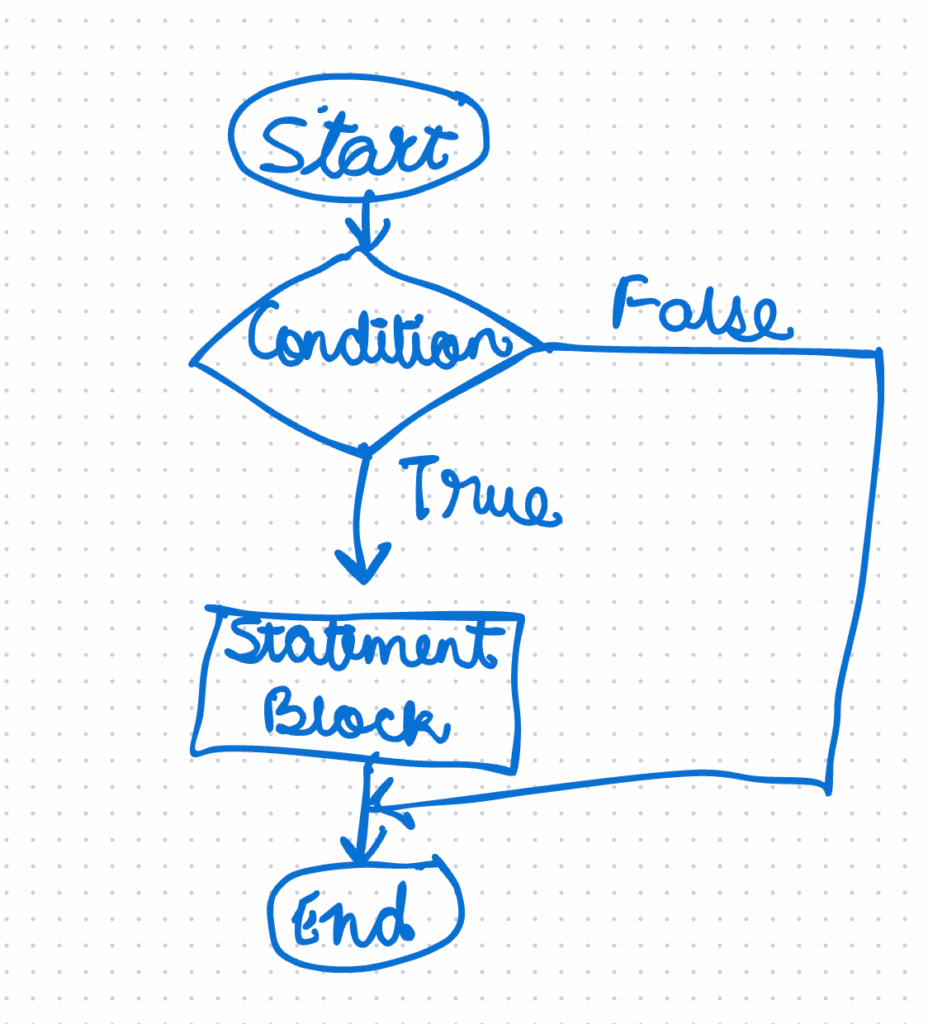
Use an if statement when you want to take an action only when something specific happens.
Example — Simple If
temperature = 32
if temperature > 30:
    print("It's a hot day!")
When temperature is greater than 30, the message prints. If you change it to 25, nothing appears, because the condition is false.
Flowchart — Simple If
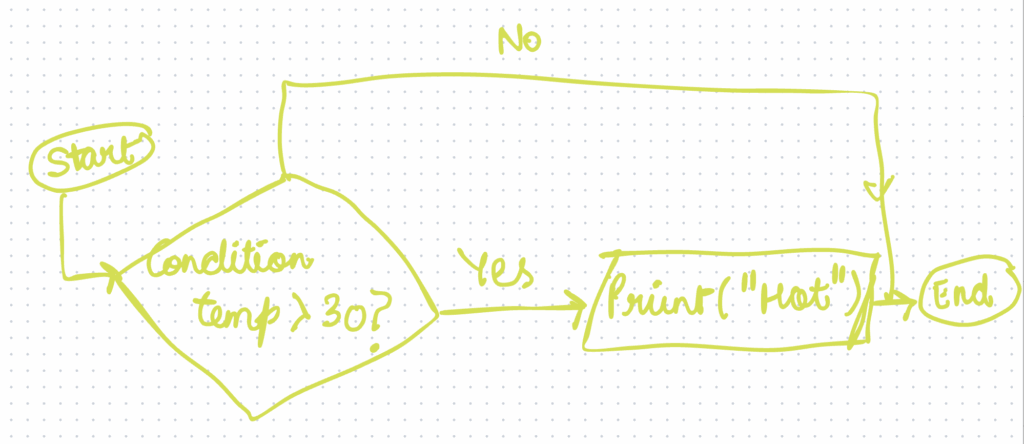
Why it matters: This is the foundation of all logic in programming. Even complex AI models eventually rely on hundreds of such true-or-false checks.
💡 Try It
Write a program to check whether a number entered by the user is positive. If it is, print “Positive number”.
if-else Statement
Often you want two outcomes: one when a condition is true, and another when it is false. That’s where the if-else statement comes in. It helps your program take an alternate path when the condition fails.
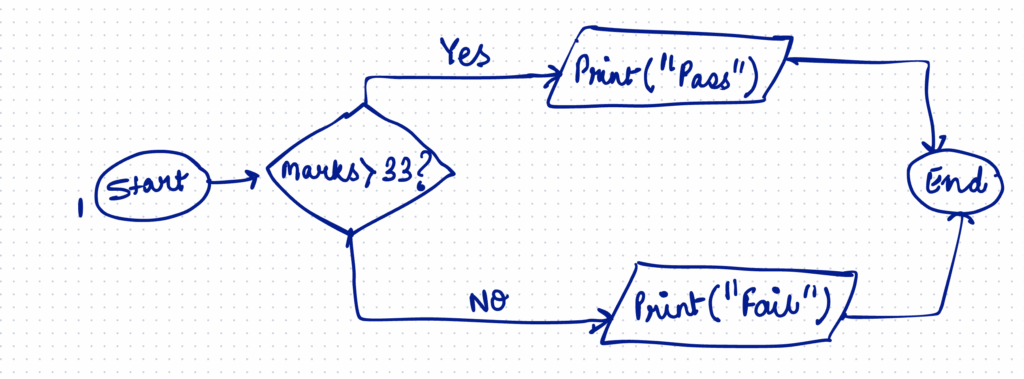
Example — Pass or Fail
score = int(input("Enter your score: "))
if score >= 33:
    print("Pass")
else:
    print("Fail")
If the score is 33 or above, “Pass” is printed; otherwise, “Fail” appears. This ensures your program always responds with an appropriate result.
Flowchart — If-Else
🪄 Tip
Indentation in Python is crucial! The statements inside if and else must be indented equally, usually four spaces.
Using elif — Multiple Conditions
Sometimes there are more than two possibilities. For instance, grades in a report card may range from A+ to C. Writing many if-else blocks becomes messy, so Python gives us elif (else if) to handle multiple options neatly.
Each elif checks another condition only if all previous ones were false.
Example — Grading System
marks = int(input("Enter marks: "))

if marks > 90:
   print("Grade A+")
elif marks >= 75:
   print("Grade A")
elif marks >= 50:
   print("Grade B")
else:
   print("Grade C")
The conditions are checked in order, top to bottom, and the first true condition decides the output.
📊 Flowchart — If-Elif-Else Ladder
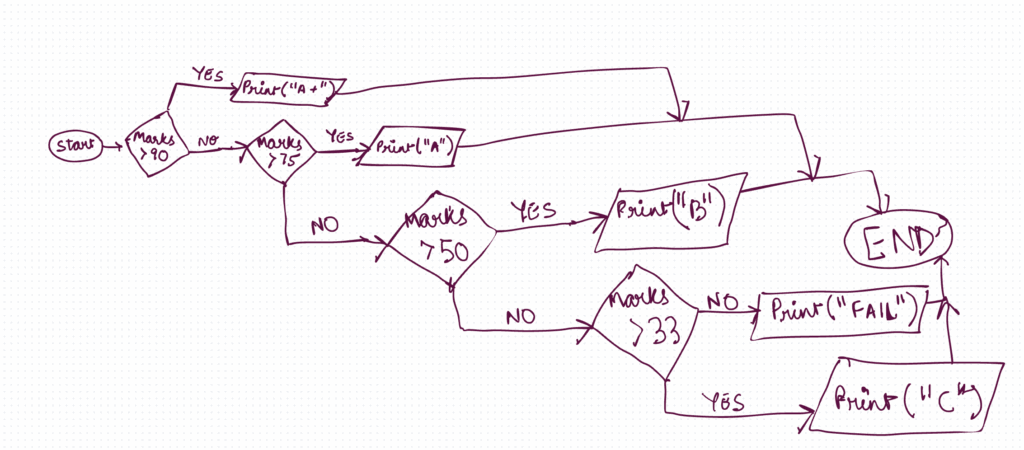
Why it matters: elif statements make your programs cleaner and easier to read when many outcomes are possible.
💡 Try It
Create a Python program that classifies marks as follows:
- “Excellent” if > 90
- “Good” if 75 – 90]
- “Average” if 50 – 75
- “Needs Improvement” otherwise
Relational and Logical Operators
Expressions that check conditions in the if statement are constructed using relational operators to compare values. They tell Python how one quantity relates to another.
| Operator | Meaning | Example | Result |
|---|---|---|---|
== | Equal to | a == 5 | True if a equals 5 |
!= | Not equal to | a != 5 | True if a is not 5 |
> | Greater than | a > b | True if a > b |
< | Less than | a < b | True if a <b |
>= | Greater than or equal to | a >= b | True if a ≥ b |
<= | Less than or equal to | a <= b | True if a ≤ b |
To build more complex conditions, we combine relational operators with logical operators:
| Operator | Works When | Example |
|---|---|---|
and | All conditions true | (age >= 13 and age <= 19) |
or | Any condition true | (city == "Delhi" or city == "Mumbai") |
not | Reverses result | not(x > 10) |
These operators help your program reason like humans by considering multiple facts at once.
⚡ Example — Triangle Check
a, b, c = 5, 7, 9

if (a + b > c) and (a + c > b) and (b + c > a):
    print("The sides form a triangle")
else:
    print("Not a triangle")
Here, all three comparisons must be true for the statement to succeed. If even one fails, the sides cannot form a triangle.
Nested If Statements
Sometimes one condition depends on another. For example, you may want to check if a number is divisible by 4 and then by 5. In such cases, you can place one if inside another. This is a nested if statement.
Nested structures allow deeper, better step-by-step decision-making.
Example — Divisibility Check
number = int(input("Enter a number: "))

if number % 4 == 0:
  if number % 5 == 0:
    print("Divisible by both 4 and 5")
  else:
    print("Divisible by 4 only")
elif number % 5 == 0:
  print("Divisible by 5 only")
else:
  print("Not divisible by 4 or 5")
Python first checks if the number is divisible by 4; only if that’s true does it check divisibility by 5.
This method keeps your logic organized and avoids unnecessary checks.
Common Pitfalls and How to Avoid Them
Even small mistakes can stop a program from running. Here are a few to watch out for:
| Mistake | Why It Happens | Correct Way |
|---|---|---|
Using = instead of == | = assigns a value instead of comparing. | Use == for comparison. |
Forgetting a colon : | Python expects a colon after every condition line. | End each if, elif, else with :. |
| Incorrect indentation | Python uses indentation to group statements. | Indent each block by 4 spaces. |
| Wrong order of conditions | If the first condition matches, others won’t run. | Arrange conditions from specific to general. |
Pro Tip: Add comments (#) for tricky logic to remember what each block does.
Quick Revision
- Decision making in Python allows programs to choose what to do depending on conditions.
- The main statements are
if,if-else, andelif. - Relational operators compare values (e.g.,
>,<,==), while logical operators combine conditions (and,or,not). - Nested ifs let you check multiple linked conditions in stages.
- Always use proper indentation and colons (
:) in conditional statements. - Remember:
=assigns a value;==compares two values. - Use flowcharts to visualize decisions before writing code.
- Practice coding tasks regularly to strengthen logic and debugging skills.
- Read your code like a story—if it sounds confusing, rewrite it simpler.
- Real-life examples (marks, discounts, age checks) make concepts easier to grasp.
Practice Exercises (Class 8 — Decision Making in Python)
A) Coding Tasks
- Even or Odd with Input Check (easy)
Write a program that asks for an integer and prints"Even"if the number is divisible by 2, else"Odd". If the user enters a non-integer value (like text), print"Invalid input"(hint: useint()carefully — assume input is always numeric for now, or show a simple message if it can’t be converted). - Marks to Grade with Validation (medium)
Ask the user for marks (0–100).
- If marks not in 0–100, print
"Invalid marks". - 91–100:
"Grade A+" - 75–90:
"Grade A" - 50–74:
"Grade B" - 0–49:
"Grade C"
- City & Age Discount (medium)
A cinema gives a 10% discount to students under 18 in Delhi or Mumbai. Input:ageandcity. If the condition matches, print"Discount applicable", else"No discount". (Useorwith city andandwith age.) - Largest of Three Numbers (medium)
Take three integersa,b,c. Print the largest value. If two or more are equal and largest, print"Tie for largest: <value>". (Use anif-elif-elseladder.) - Triangle Validity & Type (challenge)
Input three sidesa,b,c.
- First, check if they can form a triangle using the triangle inequality (
a+b>c,a+c>b,b+c>a). - If not valid, print
"Not a triangle". - If valid, print one of
"Equilateral","Isosceles", or"Scalene"based on side equality.
B) Fill in the Blanks
- In Python,
==is used for __________, while=is used for __________. - The keyword used to add more conditions after an
ifis __________. - The logical operator that is true if all conditions are true is __________.
- Every
if,elif, andelseline must end with a __________. - In an
if-elif-elseladder, conditions are checked from __________ to __________.
C) MCQs — 5 items
- What will this print if
x = 10?
if x > 10:
  print("A")
elif x == 10:
  print("B")
else:
  print("C")
A) A
B) B
C) C
D) Error
- Which operator means “not equal to”?
A)<>B)!==C)!=D)^= - Choose the correct statement about
if-elif-else:
A) All conditions are checked even after one is true.
B) Only the first true condition’s block executes.
C) Theelseblock must come before anyelif.
D) Indentation is optional. - What is the output?
city = “delhi”
if city == “Delhi” or city == “Mumbai”:
print(“Metro”)
else:
print(“Other”)
A) Metro
B) Other
C) Error
D) Delhi - Which of these produces True for
a = 5, b = 7?
A)(a > 10 and b > 10)
B)(a < 10 and b < 10)
C)not (a < 10 and b < 10)
D)(a > 10 or b > 10) and (a < 0)
D) Short Notes (50–80 words each)
- Why Decision Making Matters in Programs
Explain how conditional statements make programs flexible and responsive to inputs or real-world events, with one example from school life. - Difference between
=and==
Define each operator and show one tiny code example that illustrates the difference clearly. - Using Logical Operators (
and,or,not)
Describe when to combine conditions, why it’s useful, and give a short, realistic example. - Ordering Conditions in an
elifLadder
Explain why more specific conditions should be placed above general ones, with a grading example. - When and Why to Use Nested
if
Explain when nesting is clearer than long compound conditions, and mention one caution (readability or indentation errors).
E) Identify the Error
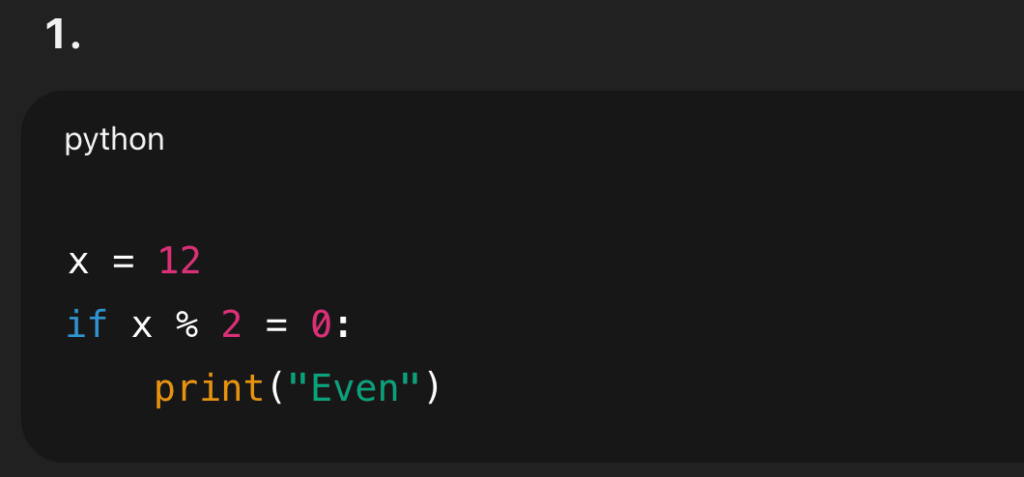
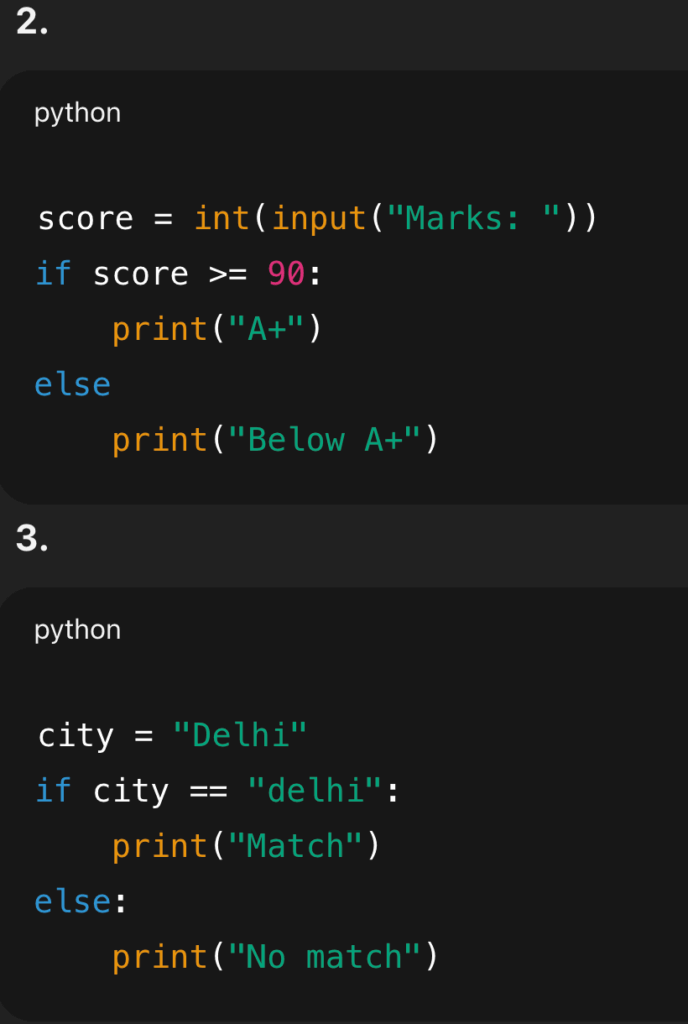
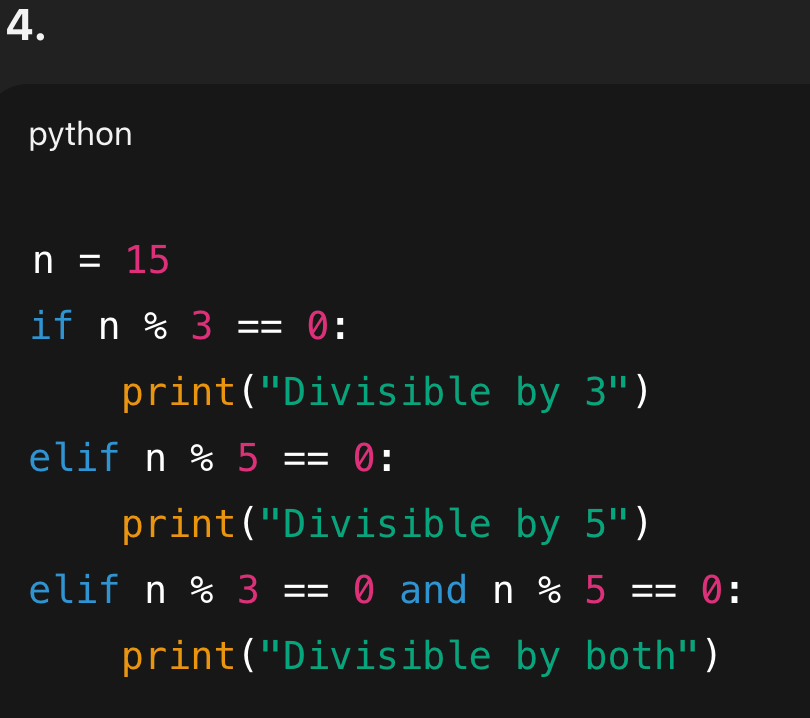
Applied Mini Project — “Smart Canteen Helper” (Decision Making)
Problem:
Your school canteen offers a discount based on student age, day of week, and wallet balance.
- If age < 14 and it’s Wednesday, apply 15% off.
- If age ≥ 14 and it’s Friday, apply 10% off.
- If wallet balance < cost after discount, print
"Add money". Else deduct and print the final remaining balance.
Inputs: age (int), day (string like "Wednesday"), wallet_balance (float), cost (float).
Output: Discount status + final payable amount + remaining balance or a message to add money.
Steps to Build:
- Ask for inputs.
- Compute discount based on rules (
if-elif-else). - Calculate payable amount =
cost - discount. - If
wallet_balance >= payable, deduct and print the new balance; else print"Add money". - Test at least 3 cases (e.g., Wed + age 13; Fri + age 15; other day).
Extension Ideas:
- Add a “Festival” flag for an extra 5% off.
- Block invalid negative values.
- Print a receipt-style summary of the transaction.
Answer Key (Teacher)
A) Coding Tasks — Model Answers (reference)
- Even or Odd with Input Check
n_str = input("Enter an integer: ")
if n_str.isdigit() or (n_str.startswith("-") and n_str[1:].isdigit()):
    n = int(n_str)
    if n % 2 == 0:
        print("Even")
    else:
        print("Odd")
else:
    print("Invalid input")
# Explanation: We gate conversion using a simple digit check to avoid crashes.
- Marks to Grade with Validation
marks = int(input("Enter marks (0-100): "))
if marks < 0 or marks > 100:
    print("Invalid marks")
elif marks >= 91:
    print("Grade A+")
elif marks >= 75:
    print("Grade A")
elif marks >= 50:
    print("Grade B")
else:
    print("Grade C")

# Explanation: Order matters—place higher bands first, then go down. Otherwise some conditions will never be reached. For instance, if you start with checking the grade C condition, then all it will be true, even for marks like 50 or 76 or 95 and the great that will be printed will be C. Because the first condition itself was true, the rest of the conditions were never checked.
- City & Age Discount
age = int(input("Age: "))
city = input("City: ")

if age < 18 and (city == "Delhi" or city == "Mumbai"):
    print("Discount applicable")
else:
    print("No discount")
# Explanation: Combine conditions with and/or as per rule.
- Largest of Three Numbers
a = int(input("a: "))
b = int(input("b: "))
c = int(input("c: "))

if a == b == c:
    print(f"Tie for largest: {a}")
elif a >= b and a >= c:
    # a is largest or tied with one value
    if (a == b and a > c) or (a == c and a > b):
        print(f"Tie for largest: {a}")
    else:
        print(a)
elif b >= a and b >= c:
    if (b == a and b > c) or (b == c and b > a):
        print(f"Tie for largest: {b}")
    else:
        print(b)
else:
    if (c == a and c > b) or (c == b and c > a):
        print(f"Tie for largest: {c}")
    else:
        print(c)
# Explanation: Checks cover strict largest and ties.
- Triangle Validity & Type
a = int(input("a: "))
b = int(input("b: "))
c = int(input("c: "))

if (a + b > c) and (a + c > b) and (b + c > a):
    if a == b == c:
        print("Equilateral")
    elif a == b or b == c or a == c:
        print("Isosceles")
    else:
        print("Scalene")
else:
    print("Not a triangle")
# Explanation: Validate first, then classify by equality.
B) Fill in the Blanks — Answers
- comparison, assignment
- elif
- and
- colon (
:) - top to bottom
C) MCQs — Answers
- B
- C
- B
- B
- B
D) Short Notes — Sample Key Points
(Teacher can accept equivalent points; samples below are within 50–80 words.)
- Why Decision Making Matters
Conditional statements let programs react to different inputs and situations. Without them, every program would run in the same static way. For example, a marks-report script must print “Pass” or “Fail” based on scores. Decision making provides flexibility, allowing software to mirror real-life choices students make daily, like carrying an umbrella if it rains. - Difference between
=and===assigns a value to a variable, while==compares two values. Example:
x = 5      # assignment
print(x == 5)  # comparison → True
Mixing them causes logic errors or syntax errors. Always use == inside conditions to check equality.
- Using Logical Operators
and,or, andnotcombine or invert conditions. Useandwhen all checks must be true,orwhen any one is enough, andnotto reverse a check. Example: a student discount might requireage < 18 and (city == "Delhi" or city == "Mumbai"). Logical operators keep code short and readable. - Ordering Conditions in
elifLadder
Place specific/stricter conditions first and broader ones later. In grading, checkmarks > 90beforemarks >= 50, otherwise the first broad condition might “catch” values and prevent later, more precise branches from running. Proper order prevents unreachable code and ensures correct outcomes. - When and Why to Use Nested
if
Use nestedifwhen one decision depends on the result of another, such as checking divisibility by 4 and then by 5. Nesting can make the logic easier to follow step by step. However, too much nesting becomes hard to read—prefer clear structure and comments, or combine conditions with logical operators when it’s simpler.
E) Identify the Error — Fixes & Explanations
Issue: Used = instead of == for comparison.
Fix:
x = 12
if x % 2 == 0:
    print("Even")
Issue: Missing colon after else.
Fix:
score = int(input("Marks: "))
if score >= 90:
    print("A+")
else:
    print("Below A+")
Issue: Case mismatch in string comparison (“Delhi” vs “delhi”).
Fix 1 (normalize input):
city = "Delhi"
if city.lower() == "delhi":
    print("Match")
else:
    print("No match")
Fix 2 (match exact case): change either the variable or the condition.
Issue: Order makes “both divisible” branch unreachable (earlier branches already catch 3 or 5).
Fix (check both first):
n = 15
if n % 3 == 0 and n % 5 == 0:
    print("Divisible by both")
elif n % 3 == 0:
    print("Divisible by 3")
elif n % 5 == 0:
    print("Divisible by 5")
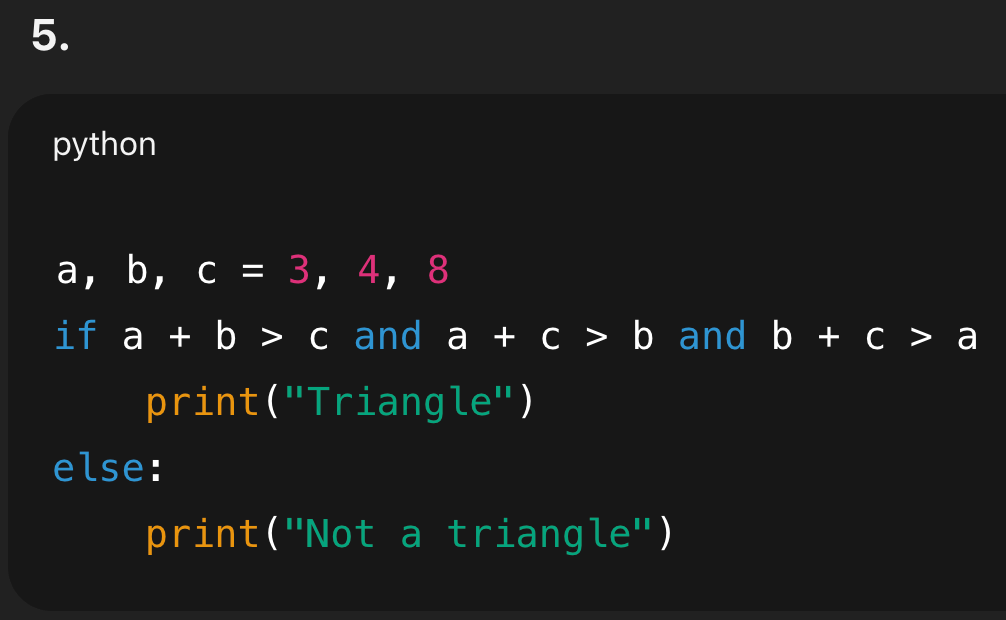
Issue: Missing colon after if.
Fix:
a, b, c = 3, 4, 8
if a + b > c and a + c > b and b + c > a:
    print("Triangle")
else:
    print("Not a triangle")
👩🏽🏫 Teacher Notes & Hints (Optional)
- Encourage students to test edge cases: marks
-1,101, triangle sides1,2,3, equal numbers for largest-of-three. - Reinforce indentation and colons as frequent pitfalls.
- Ask students to trace flowcharts before coding to reduce mistakes.