
What Will You Learn?
By the end of this lesson, you will be able to:
- Understand what data literacy means and why it matters
- Explain the Data-Information-Knowledge-Wisdom (DIKW) Pyramid
- Recognize the importance of data privacy in the digital age
- Identify common cyber security threats and how to protect yourself
- Apply data literacy concepts to everyday digital life
How frequently do you check the weather app? Most adults check it very frequently, sometimes multiple times a day during bad weather conditions.
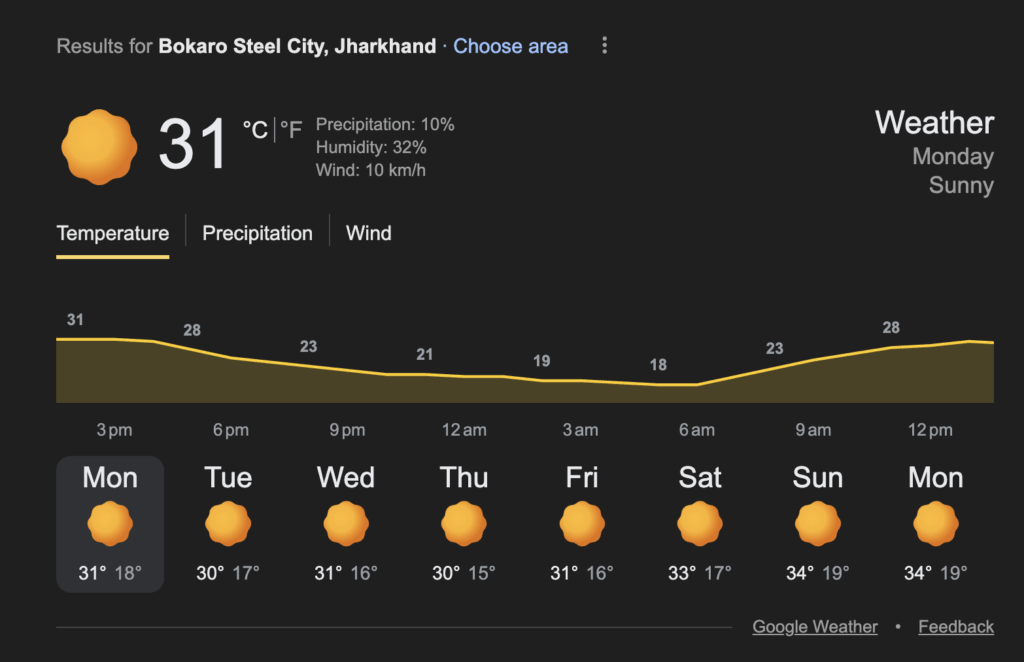
Have you ever wondered where that data comes from? Somewhere, a sensor recorded the temperature and another one the wind speed and humidity. These raw readings become data. The app processes it into information you can understand (like that shown in the figure here). Based on past patterns, it predicts whether you’ll need an umbrella. And over time, you learn to trust (or not trust!) those predictions.
This journey — from raw numbers to wise decisions — is what data literacy is all about.
In today’s world, data is everywhere. Every click, every search, every purchase generates data. Understanding how data works isn’t just useful — it’s essential. It’s like learning to read in the digital age.
What is Data Literacy?
Data Literacy is the ability to:
- Read data — Understand what data means
- Work with data — Collect, organize, and analyze it
- Analyze data — Find patterns and insights
- Communicate with data — Share findings clearly
- Question data — Think critically about data claims
Think of it as a new kind of literacy. Just as reading literacy lets you understand books, data literacy lets you understand the digital world.
💡 Key Insight
In the 21st century, data literacy is as important as reading and writing. Those who understand data have power; those who don’t can be misled by it.
Why Does Data Literacy Matter?
| Without Data Literacy | With Data Literacy |
|---|---|
| Believe fake statistics | Question and verify claims |
| Fall for misleading graphs | Spot manipulation techniques |
| Share personal data carelessly | Protect your privacy |
| Make decisions based on gut feeling | Make informed, data-driven decisions |
| Get overwhelmed by information | Extract meaning from data |
| Vulnerable to scams | Recognize suspicious patterns |
Real-Life Examples
Example 1: A news headline says “Crime increased by 200%!” Data literate response: In what area? Over what time? Was it from 1 case to 3 or 100 to 300? Context matters.
Example 2: An ad claims “9 out of 10 dentists recommend this toothpaste.” Data literate response: How many dentists were surveyed? How was the question phrased? Who funded the study?
Example 3: A social media post shows a graph where one bar looks twice as tall as another. Data literate response: Check the Y-axis — it might start at 95 instead of 0, exaggerating small differences.
The DIKW Pyramid: From Data to Wisdom
The DIKW Pyramid shows how raw data transforms into wisdom through four levels:
        /\
       /  \
      /    \
     / WISDOM \
    /----------\
   /  KNOWLEDGE  \
  /--------------\
 /  INFORMATION   \
/------------------\
/       DATA        \
/--------------------\
Level 1: Data (Base of Pyramid)
What it is: Raw facts, numbers, or observations without context.
Characteristics of data:
- Unprocessed and unorganized
- No meaning on its own
- Just symbols, numbers, or words
Examples:
- “28, 31, 27, 29, 30” (just numbers)
- “Red, Blue, Green, Red, Blue” (just colors)
- “10:30, 11:45, 09:15” (just times)
Analogy: Data is like ingredients on a kitchen counter — flour, eggs, sugar. By themselves, they’re just stuff.
Level 2: Information
What it is: Data that has been processed, organized, and given context.
Characteristics of information:
- Organized and structured
- Answers: Who? What? When? Where?
- Has meaning and context
Examples:
- “The temperatures this week in Delhi were 28°C, 31°C, 27°C, 29°C, 30°C”
- “Customer survey: 40% preferred Red, 35% Blue, 25% Green”
- “Class attendance: Rahul arrived at 10:30, Priya at 11:45, Amit at 09:15”
Analogy: Information is like a recipe — the ingredients now have structure and purpose.
Level 3: Knowledge
What it is: Information that has been analyzed to reveal patterns, relationships, and insights.
Characteristics of knowledge:
- Shows patterns and trends
- Answers: How? Why?
- Enables understanding and prediction
Examples:
- “Delhi temperatures are rising; Wednesday will likely be hot”
- “Young customers prefer Red; older customers prefer Blue”
- “Students who arrive late tend to sit in the back rows”
Analogy: Knowledge is understanding that this recipe makes a cake, and that more sugar makes it sweeter.
Level 4: Wisdom (Top of Pyramid)
What it is: The ability to apply knowledge to make good decisions and judgments.
Characteristics of wisdom gained from data:
- Involves judgment and experience
- Answers: What should we do?
- Considers ethics, values, and long-term consequences
Examples:
- “Given rising temperatures, we should schedule outdoor events for early morning”
- “To attract young customers, use red packaging; but consider if that alienates older buyers”
- “Create an attendance policy, but understand why students are late before punishing them”
Analogy: Wisdom is knowing when to bake a cake, who would enjoy it, and whether it’s worth the effort.
DIKW Pyramid: Complete Example
Scenario: School wants to improve student performance
| Level | Content | Question Answered |
|---|---|---|
| Data | Test scores: 45, 78, 82, 56, 91, 34, 67, 72… | (Raw numbers) |
| Information | Class average: 65%. 30% scored below 50%. Girls averaged 72%, boys 58%. | What happened? |
| Knowledge | Students who completed homework scored 20% higher. Attendance correlates with scores. Topics taught in morning were better understood. | Why did it happen? |
| Wisdom | Make homework submission mandatory. Investigate why some students miss class. Schedule difficult topics for morning periods. Consider if gender gap needs intervention. | What should we do? |
🧪 Think About It
Where does “Googling a fact” fall in the DIKW pyramid?
(Answer: It is usually at the Information level. You’re getting processed, contextualized data)
Data Privacy: Protecting Your Digital Self
In the digital age, you generate data constantly. Think of these everyday things you do without thinking.
| Activity | Data Generated |
|---|---|
| Browsing websites | Sites visited, time spent, clicks |
| Social media | Posts, likes, friends, location |
| Shopping online | Purchase history, preferences, payment info |
| Using apps | Location, contacts, usage patterns |
| Smart devices | Voice recordings, health data, home activity |
This data is valuable to you and to others. Data privacy is about controlling who can access and use your personal information.
Why Data Privacy Matters
If your data is not private, that is anyone can access it, it can be used for illegal and unethical activities.
| Threat | What Could Happen |
|---|---|
| Identity theft | Someone pretends to be you |
| Financial fraud | Unauthorized access to your money |
| Reputation damage | Embarrassing information made public |
| Manipulation | Targeted with personalized scams or propaganda |
| Discrimination | Decisions made about you based on data you didn’t know was collected |
Types of Personal Data
Now that you know the harm that can happen due to unauthorized access of your personal data, let’s understand the different types of personal data.
| Category | Examples | Sensitivity |
|---|---|---|
| Identifying | Name, Aadhaar, PAN, photo | High |
| Contact | Address, phone, email | Medium-High |
| Financial | Bank details, income, transactions | Very High |
| Health | Medical records, prescriptions | Very High |
| Behavioral | Browsing history, purchases, location | Medium |
| Social | Friends, messages, posts | Medium |
| Biometric | Fingerprint, face scan, voice | Very High |
Data Privacy Principles
| Principle | Meaning | Example |
|---|---|---|
| Consent | Ask before collecting | App should ask before accessing contacts |
| Purpose Limitation | Use only for stated purpose | Data collected for delivery shouldn’t be sold to advertisers |
| Minimization | Collect only what’s needed | Weather app doesn’t need access to your photos |
| Accuracy | Keep data correct and updated | Bank should let you correct wrong address |
| Storage Limitation | Don’t keep data forever | Old accounts should be deleted after inactivity |
| Security | Protect from unauthorized access | Encrypt sensitive information |
| Transparency | Tell people what you collect | Clear privacy policy |
Protecting Your Data: Practical Tips
Just talking about the negative impact of unauthorized access is meaningless if we don’t discuss ways to protect your data.
Password Security
| Bad Practice | Good Practice |
|---|---|
| “password123” | “Tr0ub4dor&3” (random, complex) |
| Same password everywhere | Different password for each account |
| Writing passwords on sticky notes | Using a password manager |
| Never changing passwords | Changing after suspected breach |
| Sharing passwords | Keeping passwords private |
Strong Password Formula:
- At least 12 characters
- Mix of uppercase, lowercase, numbers, symbols
- No personal information (birthday, name)
- No common words or patterns
Two-Factor Authentication (2FA)
2FA adds a second layer of security:
Step 1: Enter password (something you KNOW)
Step 2: Enter code from phone (something you RECEIVE at that instant)

Even if password is stolen, attacker can't get in without your phone!
Social Media Privacy
If you spend any amount of time on social media, you should protect the data that you create there. HEre are a few things you can do.
| Setting | Recommendation |
|---|---|
| Profile visibility | Friends only, not public |
| Location sharing | Disable or limit |
| App permissions | Review and minimize |
| Tagged photos | Require approval |
| Third-party apps | Remove unused ones |
Safe Online Behavior
- Think before you share — Once online, always online. So be careful about what information you are sharing online.
- Verify requests — Banks don’t ask for passwords via email. If you receive a call or SMS or message asking for them, never share. Also, alert the relevant authorities of the attempt.
- Check URLs — Look for HTTPS and correct spelling of the URL. Hackers usually have a very similar looking URLs, with minor differences.
- Update software — Security patches fix vulnerabilities, so always keep your apps, especially finance and identity apps updated.
- Use secure networks — Avoid public WiFi for sensitive tasks. Public networks have huge amount of virus, trojan, worms, etc. circulating.
Cybersecurity: Protecting Against Threats
Cybersecurity is the practice of protecting computers, networks, and data from digital attacks. These digital attacks are called cyber threats or cyber attacks.
Common Cyber Threats
1. Phishing
What it is: Fake messages that trick you into revealing information.
How it works:
You receive a message or email: "Your bank account is locked! Click here to verify."
The link goes to: fake-bank-site.com (looks real but isn't)
You enter: Username and password
Attacker gets: Your login credentials
How to protect against Phishing attacks:
- Check sender’s email address carefully
- Don’t click links in suspicious emails
- Go directly to official websites
- Look for spelling errors and urgency tactics
2. Malware
What it is: Malicious software that harms your device.
Types of Malware
| Type | What It Does |
|---|---|
| Virus | Spreads by attaching to files |
| Worm | Spreads automatically across networks |
| Trojan | Disguises as legitimate software |
| Ransomware | Locks your files until you pay |
| Spyware | Secretly monitors your activity |
How to protect:
- Install reputable antivirus software
- Don’t download from unknown sources
- Keep software updated
- Don’t open unexpected attachments
3. Social Engineering
What it is: Manipulating people into giving up information.
Examples:
- Pretending to be IT support asking for password
- Fake emergency (“Your friend is in trouble, send money!”)
- Creating trust before asking for sensitive information
How to protect: yourself against social engineering attacks:
- Verify identity through official channels
- Be suspicious of urgency and emotional manipulation
- Never share passwords, even with “IT support”
4. Identity Theft
What it is: Using someone’s personal information to impersonate them.
How it happens:
- Data breaches expose your information
- Stolen documents (Aadhaar, PAN)
- Phishing attacks
- Social media oversharing
How to protect yourself against identity theft:
- Monitor your accounts regularly
- Shred sensitive documents
- Be cautious with personal information
- Use credit monitoring services
Activity: Test Your Data Literacy
Part A: DIKW Classification
Classify each item as Data (D), Information (I), Knowledge (K), or Wisdom (W):
- “42, 38, 45, 41, 39” — __
- “Sales increased by 15% after the Diwali campaign” — __
- “We should run campaigns during festivals because customers spend more” — __
- “Customer purchase records from October” — __
- “Younger customers respond better to Instagram ads than Facebook ads” — __
Part B: Spot the Phishing
Which email is likely phishing?
Email A: “From: support@amazon.in | Subject: Your order #12345 has shipped”
Email B: “From: amaz0n-support@gmail.com | Subject: URGENT: Account suspended!! Click NOW to verify”
(Answers in Answer Key)
Real-World Case Study: Data Breach Impact
In 2023, a major Indian company experienced a data breach affecting millions of customers:
What was leaked:
- Names and addresses
- Phone numbers
- Email addresses
- Some financial information
Impact on affected people:
- Increased spam calls and messages
- Phishing attempts using leaked details
- Some cases of identity theft
- Loss of trust in the company
Lessons learned:
- Even big companies can have breaches; protect yourself
- Minimize data you share with any organization
- Monitor your accounts for unusual activity
- Use unique passwords so one breach doesn’t affect everything
Quick Recap
- Data Literacy is the ability to read, work with, analyze, and communicate with data.
- The DIKW Pyramid shows progression from Data → Information → Knowledge → Wisdom.
- Data is raw facts; Information is processed data with context; Knowledge reveals patterns; Wisdom guides decisions.
- Data Privacy is controlling who can access your personal information.
- Personal data includes identifying, financial, health, behavioral, and biometric information.
- Privacy principles: consent, purpose limitation, minimization, accuracy, storage limitation, security, transparency.
- Cyber Security protects against threats like phishing, malware, social engineering, and identity theft.
- Protect yourself with strong passwords, 2FA, careful sharing, and awareness of threats.
- Data literacy is essential for navigating the digital world safely and effectively.
Next Lesson: Types of Data in AI: How to Acquire, Process and Interpret Data (Qualitative vs Quantitative)
Previous Lesson: AI Ethics and Bias: Understanding Privacy, Fairness and Human Rights in AI
EXERCISES
A. Fill in the Blanks
- The ability to read, work with, and analyze data is called Data _________________________.
- DIKW stands for Data, Information, Knowledge, and _________________________.
- Raw facts and numbers without context are called _________________________.
- When data is processed and given context, it becomes _________________________.
- Understanding patterns and relationships in information creates _________________________.
- Applying knowledge to make good decisions is called _________________________.
- _________________________ is the practice of controlling who can access your personal information.
- Fake messages that trick you into revealing information are called _________________________.
- _________________________ is malicious software that harms your device.
- Two-Factor _________________________ adds a second layer of security beyond passwords.
B. Multiple Choice Questions
1. Data literacy is important because:
(a) It makes you good at math
(b) It helps you understand and question data claims
(c) It replaces the need for reading
(d) It’s only useful for scientists
2. In the DIKW pyramid, what comes after Information?
(a) Data
(b) Wisdom
(c) Knowledge
(d) Facts
3. “The temperature is 28°C” is an example of:
(a) Data
(b) Information
(c) Knowledge
(d) Wisdom
4. “Sales increase during festivals, so we should plan campaigns accordingly” is:
(a) Data
(b) Information
(c) Knowledge
(d) Wisdom
5. Which is NOT a type of personal data?
(a) Aadhaar number
(b) Public news articles
(c) Medical records
(d) Bank details
6. Phishing attacks typically:
(a) Install hardware on your computer
(b) Trick you into revealing information
(c) Physically steal your phone
(d) Only affect businesses
7. A strong password should:
(a) Be your birthday for easy memory
(b) Be the same for all accounts
(c) Have at least 12 characters with mixed types
(d) Be a common word
8. Two-Factor Authentication uses:
(a) Two passwords
(b) Something you know plus something you have
(c) Two email addresses
(d) Two usernames
9. Ransomware is malware that:
(a) Spreads through networks
(b) Locks your files until you pay
(c) Monitors your activity secretly
(d) Disguises as legitimate software
10. The principle of data minimization means:
(a) Collect as much data as possible
(b) Collect only what is necessary
(c) Delete all data immediately
(d) Share data with everyone
C. True or False
- Data literacy is only important for computer scientists. (__)
- In the DIKW pyramid, Wisdom is at the top. (__)
- “25, 30, 28, 32” by itself is considered Information. (__)
- Personal data includes biometric information like fingerprints. (__)
- You should use the same strong password for all accounts. (__)
- Phishing emails often create a sense of urgency. (__)
- Public WiFi is always safe for banking transactions. (__)
- Malware can disguise itself as legitimate software. (__)
- Data privacy means you should never share any information online. (__)
- Two-Factor Authentication provides better security than passwords alone. (__)
D. Define the Following (30-40 words each)
- Data Literacy
- DIKW Pyramid
- Data (in DIKW context)
- Information (in DIKW context)
- Data Privacy
- Phishing
- Malware
E. Very Short Answer Questions (40-50 words each)
- What is data literacy and why is it important in today’s world?
- Explain the DIKW pyramid with a brief description of each level.
- Give an example showing the difference between Data and Information.
- What is the difference between Knowledge and Wisdom?
- What is data privacy? List three types of personal data.
- What is phishing and how can you protect yourself from it?
- What makes a strong password? Give an example.
- What is Two-Factor Authentication and why is it useful?
- Name three types of malware and briefly describe each.
- What is social engineering in cyber security?
F. Long Answer Questions (75-100 words each)
- Explain the DIKW pyramid with a complete example from the education domain.
- What is data literacy? Why is it as important as reading and writing in the 21st century?
- Describe the different types of personal data and explain why each needs protection.
- What are the main principles of data privacy? Explain any four with examples.
- Describe four common cyber security threats and how to protect against each.
- You receive an email saying your bank account will be closed unless you click a link and verify your details. What should you do and why?
- Create a personal data protection plan covering passwords, 2FA, social media, and safe browsing.
ANSWER KEY
A. Fill in the Blanks – Answers
- Literacy — Data Literacy is the ability to understand data.
- Wisdom — DIKW: Data, Information, Knowledge, Wisdom.
- data — Data is raw, unprocessed facts.
- information — Processing data creates information.
- knowledge — Analyzing information reveals knowledge.
- wisdom — Wisdom applies knowledge to decisions.
- Data Privacy — Controlling access to personal information.
- phishing — Phishing tricks people into revealing information.
- Malware — Malicious software harms devices.
- Authentication — 2FA adds extra security.
B. Multiple Choice Questions – Answers
- (b) It helps you understand and question data claims — Core purpose of data literacy.
- (c) Knowledge — Order: Data → Information → Knowledge → Wisdom.
- (b) Information — It has context (temperature, unit, meaning).
- (d) Wisdom — Applying knowledge to make a decision.
- (b) Public news articles — Public information isn’t personal data.
- (b) Trick you into revealing information — Definition of phishing.
- (c) Have at least 12 characters with mixed types — Strong password criteria.
- (b) Something you know plus something you have — Password + phone code.
- (b) Locks your files until you pay — Ransomware definition.
- (b) Collect only what is necessary — Minimization principle.
C. True or False – Answers
- False — Data literacy is important for everyone in the digital age.
- True — Wisdom is the highest level of the DIKW pyramid.
- False — Numbers alone without context are Data, not Information.
- True — Biometric data is a type of personal data.
- False — Use different passwords for different accounts.
- True — Urgency is a common phishing tactic.
- False — Public WiFi is risky for sensitive transactions.
- True — Trojans disguise as legitimate software.
- False — Data privacy is about controlling data, not avoiding all sharing.
- True — 2FA provides additional security layer.
D. Definitions – Answers
1. Data Literacy: The ability to read, work with, analyze, and communicate with data, including questioning data claims and understanding how data can be used or misused.
2. DIKW Pyramid: A model showing how raw data transforms into useful wisdom through four levels: Data (raw facts), Information (processed data), Knowledge (patterns and insights), Wisdom (applied judgment).
3. Data (in DIKW): Raw, unprocessed facts, numbers, or observations without any context or meaning. Examples include numbers, measurements, or recordings before any organization or interpretation.
4. Information (in DIKW): Data that has been processed, organized, and given context to become meaningful. Information answers questions like who, what, when, and where.
5. Data Privacy: The right and ability to control who can access, collect, and use your personal information, including principles like consent, security, and purpose limitation.
6. Phishing: A cyber attack where criminals send fake messages (emails, texts) pretending to be legitimate organizations to trick people into revealing passwords, financial information, or other sensitive data.
7. Malware: Malicious software designed to harm computers or steal data. Types include viruses, worms, trojans, ransomware, and spyware, each with different methods of attack.
E. Very Short Answer Questions – Answers
1. Data literacy and its importance:
Data literacy is the ability to understand, analyze, and communicate with data. It’s important because we’re surrounded by data claims — in news, ads, social media. Without data literacy, we can be misled or manipulated.
2. DIKW pyramid levels:
Data: Raw facts without context (numbers, recordings). Information: Processed data with meaning (organized, contextualized). Knowledge: Patterns and insights from information (trends, relationships). Wisdom: Applied judgment using knowledge (decisions, actions).
3. Data vs Information example:
Data: “28, 31, 27, 29” (just numbers, no meaning). Information: “Delhi temperatures this week: Monday 28°C, Tuesday 31°C, Wednesday 27°C, Thursday 29°C” (same numbers with context and meaning).
4. Knowledge vs Wisdom difference:
Knowledge: Understanding patterns (e.g., “Sales increase 40% during Diwali”). Wisdom: Using that understanding to make good decisions (e.g., “We should stock more inventory before Diwali but not overstock perishables”).
5. Data privacy and types:
Data privacy is controlling who accesses your personal information. Types: Identifying data (name, Aadhaar), Financial data (bank details, income), Health data (medical records), Biometric data (fingerprint, face scan).
6. Phishing protection:
Phishing is fake messages tricking you into revealing information. Protection: Check sender addresses carefully, don’t click suspicious links, go directly to official websites, look for urgency tactics and spelling errors.
7. Strong password:
Strong passwords have: 12+ characters, mixed uppercase/lowercase/numbers/symbols, no personal info, no common words. Example: “Mng0&Str@wberry42” — long, random, mixed character types.
8. Two-Factor Authentication:
2FA requires two verification methods: something you know (password) plus something you have (phone code). It’s useful because even if password is stolen, attackers need your physical device too.
9. Three malware types:
Virus: Attaches to files and spreads when files are shared. Ransomware: Encrypts your files and demands payment to unlock. Spyware: Secretly monitors your activity and steals information.
10. Social engineering:
Social engineering manipulates people psychologically to reveal information or take actions. Examples: pretending to be IT support, creating fake emergencies, building trust before asking for sensitive data.
F. Long Answer Questions – Answers
1. DIKW with education example:
Data: Student test scores — 45, 78, 82, 56, 91, 34, 67 (raw numbers). Information: Class average is 65%, 30% failed, science scores are lower than math (processed, contextualized). Knowledge: Students who complete homework score 25% higher; morning classes perform better (patterns identified). Wisdom: Make homework mandatory, schedule difficult subjects for morning, investigate why some students skip homework rather than just punishing them (applied judgment with ethics).
2. Data literacy importance:
Data literacy is understanding how to read, analyze, and question data. It’s crucial because: data is everywhere (social media, news, ads), decisions are increasingly data-driven, misinformation spreads easily, and personal data affects privacy/security. Like reading lets you understand books, data literacy lets you understand the digital world. Without it, people can be manipulated by misleading statistics, fall for scams, or make poor decisions.
3. Personal data types and protection:
Identifying data (name, Aadhaar, photo): Enables identity theft if exposed. Financial data (bank details, transactions): Direct financial loss if compromised. Health data (medical records): Privacy violation, discrimination risk. Behavioral data (browsing, location): Enables profiling and manipulation. Biometric data (fingerprint, face): Cannot be changed if compromised. Each needs protection because misuse can cause harm ranging from financial loss to discrimination to physical danger.
4. Data privacy principles:
Consent: Organizations must ask permission before collecting data (e.g., apps requesting access to contacts). Purpose Limitation: Data collected for one purpose shouldn’t be used for another (e.g., delivery address not sold to advertisers). Minimization: Collect only necessary data (e.g., weather app doesn’t need your photos). Security: Protect data from breaches (e.g., encryption, secure servers). These principles protect individuals from exploitation.
5. Cyber threats and protection:
Phishing: Fake messages tricking you — protect by verifying senders, checking URLs. Malware: Harmful software — protect with antivirus, avoiding unknown downloads. Social Engineering: Psychological manipulation — protect by verifying identities, being skeptical of urgency. Identity Theft: Using your info to impersonate — protect by monitoring accounts, limiting shared information, using strong unique passwords.
6. Suspicious bank email response:
Do NOT click any links. This shows classic phishing signs: urgency (“will be closed”), threat, request for action. Instead: Open a new browser, go directly to your bank’s official website, log in normally, check for any real alerts. Or call your bank using the number on your card. Report the email as phishing. Banks never ask for passwords via email. Clicking could lead to fake site stealing credentials or installing malware.
7. Personal data protection plan:
Passwords: Use 12+ character unique passwords for each account, store in password manager, change after any breach. 2FA: Enable on all important accounts (email, bank, social media), use authenticator app over SMS when possible. Social Media: Set profiles to private, limit personal details shared, review tagged photos, remove unused apps. Safe Browsing: Check for HTTPS, verify URLs before clicking, avoid public WiFi for banking, keep software updated, don’t download from unknown sources. Regular Habits: Monitor accounts for suspicious activity, review privacy settings monthly.
Activity Answers
Part A: DIKW Classification
- “42, 38, 45, 41, 39” — D (Data) — Just numbers, no context
- “Sales increased by 15% after the Diwali campaign” — I (Information) — Processed data with context
- “We should run campaigns during festivals because customers spend more” — W (Wisdom) — Decision based on knowledge
- “Customer purchase records from October” — D (Data) — Raw records without analysis
- “Younger customers respond better to Instagram ads than Facebook ads” — K (Knowledge) — Pattern/insight from data
Part B: Spot the Phishing
Email B is phishing. Signs:
- Sender “amaz0n-support@gmail.com” uses zero instead of ‘o’, and Amazon wouldn’t use Gmail
- All caps “URGENT” and “Click NOW” create false urgency
- Threat of account suspension
- Multiple exclamation marks — unprofessional
Email A appears legitimate — official domain, normal order notification.
Next Lesson: Types of Data in AI: How to Acquire, Process and Interpret Data (Qualitative vs Quantitative)
Previous Lesson: AI Ethics and Bias: Understanding Privacy, Fairness and Human Rights in AI