

Python is a high-level, interpreted programming language created by Guido van Rossum and released in 1991. It’s popular because the code is readable, concise, and powerful. It is used for AI/ML, websites, data analysis, automation, games, and more.
This lesson covers Python basics you’ll actually use: how to write and run code, foundational building blocks (tokens, variables, data types, strings, operators), safe input handling, and a few short practice programs.
Writing and Running Python Programs
There are two practical ways to code in Python.
1) Interactive Shell (REPL)
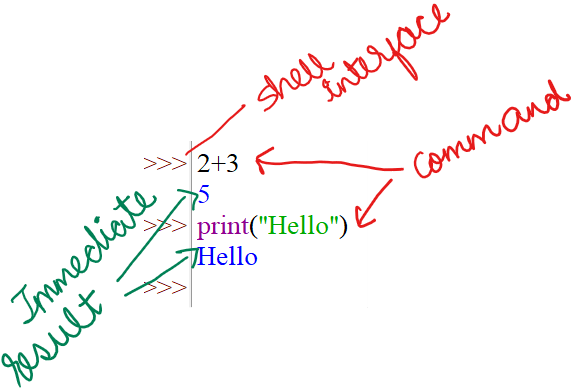
Interactive shell is an REPL, which stands for Read–Eval–Print Loop. It reads your typed code, evaluates (runs) it, prints the result, and then loops so you can try the next line. It’s perfect for quick experiments and learning. You see results instantly without saving a file.
For example, you type 2 + 3 and it immediately prints 5 . You type print("Hello") and it prints Hello.
Type one line, press Enter, see the result immediately.
2) Script Mode (files that you run)
Write multiple lines in a file (e.g., first_program.py), save, then run it. Ideal for complete programs.

Tools you can use
- IDLE (bundled with Python): simple and beginner-friendly
- VS Code: a modern editor you’ll grow into
- Online editors (when you can’t install software)
💡 Tip
In IDLE: Click File → New File to open an editor window (script mode). Save as
.py, then Run → Run Module (or press F5).
Building Blocks of Python
Every language has building blocks. Like alphabets, words, and grammar in English, Python too has its building blocks. Let’s go through them one by one.
#1 Tokens (the smallest building blocks)
Tokens are the basic units that form Python code.
- Keywords: reserved words like
if,else,while,for,def,class,True,False - Identifiers: names you create for variables, functions, classes, etc. (
total_marks,name) - Literals: fixed values like
10,3.14,"Hello",True - Operators:
+ - * / % ** //,== != > < >= <=,and or not - Punctuation:
(),:,,,[],{}, etc. - Whitespace/Indentation: Python requires consistent indentation to define blocks
if score >= 50:
    print("Pass")     # this line is inside the 'if' block
    print("Good job!")
⚠️ Note
Indentation is not optional style in Python; it’s part of the syntax. Use 4 spaces per level.
🧪 Try It
Open the interactive shell and type:
import keyword
print(keyword.kwlist)    # list of Python keywords
Here is the output:

#2 Variables (names that store values)
Variables are labels pointing to values in memory. Think of variables as boxed with value inside them. Labels are the variable names, also called identifiers.
name = "Aanya"
age = 13
Character set (what you can type in Python)
Python files use the UTF-8 character set by default, which means you can put
- letters
- numbers
- punctuation
- spaces
- many international characters inside strings (for example
"hello","नमस्ते","3.14","😊").
Case sensitivity
Python is case sensitive. That means names that look similar but differ in upper/lowercase are treated as different names.
name = "Asha"
Name = "Rohan"
print(name)   # prints: Asha
print(Name)   # prints: Rohan
name, Name and NAME are three different identifiers. A mistyped case is a common bug.
💡 Tip
Reserved words (keywords) like
if,for,classcannot be used as names.
🧪 Try it
Type x = 5; X = 10; print(x, X) in the REPL and observe the output.
Naming Conventions / Rules
- An identifier must start with a letter (a–z, A–Z) or an underscore
_. It cannot start with a digit.- Valid:
score,_temp,age2 - Invalid:
2age,first-name
- Valid:
- After the first character, you may use letters, digits and underscores only.
- Identifiers are case sensitive (
score≠Score). - Do not use Python keywords as names (
if,for,def,class, etc.).
Common naming conventions (good practice)
snake_case— recommended for most variables and functions in Python:student_name,total_marks.PascalCase(orCamelCase) — often used for class names:StudentRecord,MathQuiz.SCREAMING_SNAKE_CASE— used for constants (fixed values):PI = 3.14,MAX_SCORE = 100.
Why conventions matter: They make code easier to read and maintain. If everyone uses snake_case for variables, you can tell a variable from a class or a constant at a glance.
Examples
# good
student_name = "Mira"
MAX_SCORE = 100

# bad
first-name = "Mira"   # hyphen not allowed
2ndStudent = "Ravi"   # cannot start with digit
🧪 Try it
In a script, create total_marks = 85, TotalMarks = 90. Print both. Notice they are different. Then try naming a variable class = 5 and observe the error (explain why).
- Python is dynamically typed: type follows the value you assign
x = 10        # int
x = "ten"     # now a str
If I were writing the same code in another language, say, C, I would write:
int x; str y; #declaring the data types of the variables I am going to use later
x = 10;       #yes, for many languages you need to indicate the end of instruction
y = “ten”;    #here it is being done with a semi-colon. In Python, new line does that
Dynamically typed language (like Python) means a variable’s type is decided at ****runtime, i.e. when the program is running, based on the value you assign. You don’t declare types up front. So theoretically, the same variable can later hold a different type (e.g., x = 2 then after a few instructions, x = "hello") but it is considered poor/sloppy programming practice.
Dynamic typing makes code quicker to write and flexible, but type errors may appear only when that line runs, so testing is important.
🧪 Try It
Create one variables. First assign it your name and print it. Then, assign it your roll number and print.
#3. Data Types (what kind of value is stored?)
Core data types that you will be using this year are:
- int → whole numbers (
7,42) - float → decimals (
3.14,0.5) - str → text (
"Python",'Class8') - bool → logical values (
True,False)
Why types matter:
print(2 + 3)       # 5  (numeric addition)
print("2" + "3")   # "23" (string concatenation)
💡 Tip
You can check a value’s type with
type(value). Go ahead and use it:
🧪 Try It
Predict then run:
print(type(42))
print(type(3.0))
print(type("42"))
print(type(True))
#4. Operators
Arithmetic operators: + - * / // % **
/→ true division (always returns float)//→ floor division%→ remainder*→ exponent
Comparison operators: == != > < >= <=
The result is always True/False
Logical operators: and, or, not
age = 15
eligible = (age >= 13) and (age <= 18)
print(eligible)   # True
💡 Tip
When expressions get long, add parentheses. It improves readability and avoids precedence mistakes.
🧪 Try It
Evaluate each and note the result:
print(5 / 2, 5 // 2, 5 % 2, 2 ** 5)
print((3 + 5) * 2 == 16)
print(not (True and False) or (3 > 1))
#5. Strings
Create strings with single ' or double " quotes. Here are a few operations you can do with strings:
- Concatenation: Use
+to join strings, e.g."Hello" + " " + "World"→"Hello World". - Repetition: Use to repeat a string, e.g.
"Ha" * 3→"HaHaHa". - Length:
len(s)returns the number of characters ins, e.g.len("Python")→6. - Indexing:
s[i]gives the single character at positioni(zero-based);s[-1]is the last character (out-of-range raisesIndexError). - Slicing:
s[start:stop:step]returns a substring fromstart(inclusive) tostop(exclusive) with optionalstep, e.g."Python"[0:3]→"Pyt".
g = "Hello"
n = "Ravi"
print(g + " " + n)     # concatenation
print("Ha!" * 3)       # repetition
print(len("Python"))   # length

word = "Python"
print(word[0])       # 'P' (indexing starts at 0)
print(word[0:3])     # 'Pyt' (slicing)
Escape sequences
Escape sequences are special backslash \\-prefixed characters used inside string literals to represent characters you can’t type directly because they would become strings. For example:
\\nnew line\\ttab\\\\for a literal backslash\\"double quote inside a double-quoted string
When Python reads a string it converts those sequences into the actual character (so "Hello\\nWorld" prints Hello on one line and World on the next). Use them whenever you need formatting or to include quote or backslash characters inside a quoted string.
🧪 Try It
Create a string with your full name, then print:
- first character
- last three characters
- the length
Input & Type Conversion
input() command always returns string data type. Even if you enter a number, say 23, -65, it is a string. You can take an input and check its type using type() command. So, you need to convert string to numeric, i.e., int or float, data types before doing maths.
x = input("Enter a number: ")  # suppose user types 5
print(x + x)                   # "55" (string join, i.e. concatenation), not 10
Convert properly:
x = int(input("Enter an integer: "))
y = float(input("Enter a decimal: "))
print(x + y)
Clean output with f-strings
f-strings (formatted string literals) let you embed expressions directly inside string literals by prefixing the string with f and placing expressions in {} . They are evaluated at runtime and replaced by the value inside { }, not the variable name or expressions themselves.
You can also add format specifiers inside the braces to control presentation (for example {value:.2f} prints a float with two decimal places), e.g.
name="Ravi"; score=83.456; print(f"{name}: {score:.2f}") prints Ravi: 83.46.
name = "Ravi"
score = 83.5
print(f"Hello {name}, your score is {score:.2f}")
💡 Tip
Literals are fixed values. When you say print(”Hello World”), Python treats Hello World as a string literal.
🧪 Try It
Take inputs for two integers and print their sum, difference, product, and quotient, each on a new line, labeled clearly.
a = int(input("Enter first integer: "))
b = int(input("Enter second integer: "))

print(f"Sum: {a + b}")
print(f"Difference: {a - b}")
print(f"Product: {a * b}")
print(f"Quotient: {a / b}")
Short Practice Programs
A) Marks Calculator
name = input("Enter your name: ")
m1 = int(input("Maths Marks: "))
m2 = int(input("Science Marks: "))

total = m1 + m2
average = total / 2
percentage = (total / 200) * 100

print(f"Hello {name}, Total = {total}, Average = {average:.2f}, Percentage = {percentage:.2f}%")
B) Mini Calculator
a = int(input("Enter first number: "))
b = int(input("Enter second number: "))

print("Sum =", a + b)
print("Difference =", a - b)
print("Product =", a * b)
print("Quotient =", a / b)
C) Temperature Converter (°C → °F)
c = float(input("Enter °C: "))
f = (c * 9/5) + 32
print(f"Temperature in °F = {f:.1f}")
Quick Checks (self-review)
- Can you explain token, identifier, literal, and operator?
- Why does
input()need type conversion for maths? - What’s the difference between
/and//? - Why is indentation critical in Python?
Quick Revision
- What is Python: a high-level, interpreted language used for scripting, web, data, AI and more.
- REPL: Read–Eval–Print Loop — type a line, see the result immediately (great for experiments).
- Script mode: save code in a
.pyfile and run it to execute multi-line programs. - Tokens: smallest units of code (keywords, identifiers, literals, operators, punctuation).
- Identifiers: names you give to variables/functions/classes; must start with a letter or
_, no spaces, case-sensitive. - Naming rules / style: use
snake_casefor variables/functions,PascalCasefor classes,UPPER_SNAKE_CASEfor constants. - Character set: source files use UTF-8; identifiers should stick to letters, digits, and underscore for portability.
- Variables: labeled boxes that hold values; you assign with
=(e.g.,score = 42). - Literals: fixed values written in code (e.g.,
42,3.14,"Hello",True). - Dynamic typing: types are decided at runtime — a variable can be rebound to different types (
x = 2→x = "hi"). - Core data types:
int,float,str,bool. Usetype(value)to check. - Arithmetic operators:
+ - * / // % **(note/returns float,//is floor division). - Comparison operators:
== != > < >= <=— results areTrueorFalse. - Logical operators:
and,or,not— combine boolean expressions. - Strings basics: concat with
+, repeat with , lengthlen(s), indexs[i], slices[start:stop:step]. - Escape sequences:
\\n,\\t,\\",\\\\for newline, tab, quotes, backslash inside strings. - Input & conversion:
input()returns a string — convert withint()orfloat()before math. - Clean printing: f-strings
f"Hello {name}, {score:.2f}"make formatted output easy. - Indentation matters: consistent indentation (usually 4 spaces) defines code blocks; wrong indentation causes errors.
- Common mistakes to avoid: forgetting
:afterif/def, using=vs==, mixing case in names, not converting input before arithmetic. - Try-it habit: test small ideas in REPL, then move to script mode for full programs.
- What’s next: decision making (
if / elif / else) and loops (for,while) — where programs start to make choices and repeat tasks.
Exercises (with Answer Key)
Section 1: Write Programs
- (Q1) Write a Python program that takes two integers as input and prints their sum, difference, product, and quotient, each on a new line with clear labels.
- (Q2) Write a Python program that takes the diameter of a circle as input and prints its circumference. Use
π = 3.14. - (Q3) Write a Python program that takes the side of an equilateral triangle and prints its area and perimeter. (Area formula = (√3/4) × side²; perimeter = 3 × side).
- (Q4) Write a Python program that reads four numbers and prints their product.
- (Q5) Write a Python program that takes length and breadth of a rectangle and prints its perimeter.
- (Q6) Write a Python program that reads an integer and prints its cube.
- (Q7) Write a Python program to calculate Simple Interest. Input: Principal, Rate (annual %), Time (years). Output: Simple interest = (P × R × T)/100.
- (Q8) Write a Python program to input length, breadth and height of a cuboid and print its volume.
Section 2: Fill in the blanks
(These are sentence-style blanks; fill with a single word or short phrase.)
- (F1) ______ are the kind of values
TrueandFalseare called. - (F2) A ________ operator requires only one operand.
- (F3) The smallest individual unit in a program is called a ________.
- (F4) The ________ operator is used to check equality between values.
- (F5) ________ statement is used to accept a value of a variable given by the user.
- (F6) A ________ datatype is used to store a set of characters in single or double quotes.
- (F7) The function used to find the number of characters in a string is ________.
- (F8) Using
input()always returns data as a ________ unless converted. - (F9) Indentation in Python defines the ________ of the code (for example which lines belong to an if or function).
- (F10) An f-string starts with the letter ________ before the opening quote.
Section 3: Multiple Choice Questions
For each, choose the most suitable alternative.
- (M1) Which of the following is a valid variable name in Python?
(i)2name(ii)first-name(iii)_student(iv)class - (M2) What is the output of the expression
30 % 6?
(i) 0 (ii) 5 (iii) 1 (iv) 8 - (M3) Which of the following is a data type?
(i) int (ii) float (iii) str (iv) All of these - (M4) Which of the following is a logical operator?
(i) and (ii) or (iii) not (iv) All of these - (M5) Which mode enables you to type code in more than one line?
(i) Programming Mode (ii) Script mode (iii) Execution mode (iv) None of these - (M6) What does
len("Python")return?
(i) 5 (ii) 6 (iii) 7 (iv) Error - (M7) Which operator is used to compare if two values are equal?
(i) = (ii) := (iii) == (iv) === - (M8) If
a = "2"andb = 3, what is the result ofa + str(b)?
(i) 5 (ii)"23"(iii)"5"(iv) Error - (M9) Which of the following will cause a
TypeError?
(i)3 + 4(ii)"3" + "4"(iii)"3" + 4(iv)int("3") + 4 - (M10) Which keyword defines a function in Python?
(i) function (ii) def (iii) func (iv) define
Section 4: Short notes
Write short notes (one short paragraph each) on:
- (S1) REPL (Read–Eval–Print Loop)
- (S2) Variables and dynamic typing in Python
- (S3) Escape sequences in strings (
\\n,\\t,\\",\\\\) - (S4) f-strings and formatted output
- (S5) Operators in Python
Section 5: Identify errors and give corrected code.
- (E1)
x = input("Enter number: ")
y = input("Enter number: ")
print("Sum is " + x + y)
- (E2)
if score > 40
    print("Passed")
- (E3)
a = 10
b = 0
print("Quotient:", a/b)- (E4)
def greet()
print("Hello")- (E5)
name = 'Anu
print(name)- (E6)
Value = 5
print(value)- (E7)
print "Hello, World!"
Answer Key (with questions)
Q1 — Write a Python program that takes two integers as input and prints their sum, difference, product, and quotient, each on a new line with clear labels.
Answer Q1
# Q1: Read two integers and print labeled results
try:
    a = int(input("Enter first integer: "))
    b = int(input("Enter second integer: "))
except ValueError:
    print("Please enter valid integers.")
else:
    print(f"Sum: {a + b}")
    print(f"Difference: {a - b}")
    print(f"Product: {a * b}")
    if b != 0:
        print(f"Quotient: {a / b}")
    else:
        print("Quotient: undefined (division by zero)")
Explanation: Convert inputs to int before arithmetic. Use f-strings to label; handle division-by-zero.
Q2 — Write a Python program that takes the diameter of a circle as input and prints its circumference. Use π = 3.14.
Answer Q2
# Q2: Circumference from diameter
d = float(input("Enter diameter of circle (units): "))
pi = 3.14
circumference = pi * d
print(f"Circumference = {circumference:.2f}")
Explanation: Circumference = π × diameter. Format to 2 decimals for neat output.
Q3 — Write a Python program that takes the side of an equilateral triangle and prints its area and perimeter. (Area = (√3/4) × side²; perimeter = 3 × side).
Answer Q3
# Q3: Area and perimeter of equilateral triangle
import math

side = float(input("Enter side of equilateral triangle: "))
area = (math.sqrt(3) / 4) * (side ** 2)
perimeter = 3 * side

print(f"Area = {area:.2f}")
print(f"Perimeter = {perimeter:.2f}")
Explanation: Use math.sqrt(3) for √3; format outputs.
Q4 — Write a Python program that reads four numbers and prints their product.
Answer Q4
# Q4: Product of 4 numbers
nums = []
for i in range(4):
    nums.append(float(input(f"Enter number {i+1}: ")))

product = 1
for n in nums:
    product *= n

print(f"Product = {product}")
Explanation: Read four values (float to allow decimals) and multiply iteratively.
Q5 — Write a Python program that takes length and breadth of a rectangle and prints its perimeter.
Answer Q5
# Q5: Perimeter of rectangle
length = float(input("Enter length: "))
breadth = float(input("Enter breadth: "))
perimeter = 2 * (length + breadth)
print(f"Perimeter = {perimeter}")
Explanation: Perimeter = 2 × (length + breadth).
Q6 — Write a Python program that reads an integer and prints its cube.
Answer Q6
# Q6: Cube of a number
n = float(input("Enter a number: "))
cube = n ** 3
print(f"Cube = {cube}")
Explanation: Use ** 3 for cube. Using float allows integer or decimal input.
Q7 — Write a Python program to calculate Simple Interest. Input: Principal, Rate (annual %), Time (years). Output: Simple interest = (P × R × T)/100.
Answer Q7
# Q7: Simple Interest
P = float(input("Enter Principal (P): "))
R = float(input("Enter Rate (R) (annual %): "))
T = float(input("Enter Time (T) in years: "))

SI = (P * R * T) / 100
print(f"Simple Interest = {SI}")
Explanation: Direct formula; floats handle decimals.
Q8 — Write a Python program to input length, breadth and height of a cuboid and print its volume.
Answer Q8
# Q8: Volume of a cuboid
length = float(input("Enter length: "))
breadth = float(input("Enter breadth: "))
height = float(input("Enter height: "))

volume = length * breadth * height
print(f"Volume = {volume}")
Explanation: Volume = length × breadth × height.
F1 — True and False are ______________ values.
Answer F1: Boolean
Explanation: True and False are boolean values.
F2 — A ________ operator requires only one operand.
Answer F2: Unary
Explanation: Unary operators take one operand (e.g., -x, not x).
F3 — The smallest individual unit in a program is called a ________.
Answer F3: Token
Explanation: Tokens include keywords, identifiers, literals, operators.
F4 — The ________ operator is used to check equality between values.
Answer F4: ==
Explanation: == compares values; = assigns.
F5 — ________ statement is used to accept a value of a variable given by the user.
Answer F5: input()
Explanation: input() reads a line from the user as a string.
F6 — A ________ datatype is used to store a set of characters in single or double quotes.
Answer F6: String (str)
Explanation: Strings store text in quotes.
F7 — The function used to find the number of characters in a string is ________.
Answer F7: len()
Explanation: len(s) returns length of s.
F8 — Using input() always returns data as a ________ unless converted.
Answer F8: String
Explanation: Convert with int()/float() for numeric use.
F9 — Indentation in Python defines the ________ of the code (for example which lines belong to an if or function).
Answer F9: Block (or scope)
Explanation: Indentation groups statements into blocks.
F10 — An f-string starts with the letter ________ before the opening quote.
Answer F10: f
Explanation: Example: f"Hello {name}".
M1 — Which of the following is a valid variable name in Python?
Answer M1: (iii) _student —
Explanation: Variable names must not start with a digit. Hyphens are not allowed. class is a reserved keyword.
M2 — What is the output of the expression 30 % 6? (i) 0 (ii) 5 (iii) 1 (iv) 8
Answer M2: (i) 0 — remainder is 0.
M3 — Which of the following is a data type? (i) List (ii) Tuple (iii) Dictionary (iv) All of these
Answer M3: (iv) All of these — all are Python data types.
M4 — Which of the following is a logical operator? (i) and (ii) or (iii) not (iv) All of these
Answer M4: (iv) All of these — and, or, not are logical operators.
M5 — Which mode enables to type codes in more than one line? (i) Programming Mode (ii) Script mode (iii) Execution mode (iv) None of these
Answer M5: (ii) Script mode — script files hold multi-line programs.
M6 — What does len("Python") return? (i) 5 (ii) 6 (iii) 7 (iv) Error
Answer M6: (ii) 6 — “Python” has 6 characters.
M7 — Which operator is used to compare if two values are equal? (i) = (ii) := (iii) == (iv) ===
Answer M7: (iii) == — equality comparison.
M8 — If a = "2" and b = 3, what is the result of a + str(b)? (i) 5 (ii) “23” (iii) “5” (iv) Error
Answer M8: (ii) “23” — str(b) becomes "3", then concatenated.
M9 — Which of the following will cause a TypeError? (i) 3 + 4 (ii) "3" + "4" (iii) "3" + 4 (iv) int("3") + 4
Answer M9: (iii) "3" + 4 — cannot add string and integer.
M10 — Which keyword defines a function in Python? (i) function (ii) def (iii) func (iv) define
Answer M10: (ii) def — used to define functions.
S1 — REPL (Read–Eval–Print Loop)
Answer S1: REPL stands for Read–Eval–Print Loop. It’s the interactive Python prompt that reads the code you type, evaluates (runs) it, prints the result, and then waits for the next command. REPL is useful for quick experiments, testing small snippets, learning functions, and debugging because you get immediate feedback without saving files. IDLE and many online Python consoles provide REPL interfaces.
S2 — Variables and dynamic typing in Python
Answer S2: A variable in Python is a name that refers to a value. Python is dynamically typed, which means the type of a variable is determined at runtime by the value assigned; you do not declare the type explicitly. For example, x = 10 creates an integer binding; later x = "ten" rebinds x to a string. This makes development quick but requires careful testing since type-related errors appear when the code runs.
S3 — Escape sequences in strings (\\n, \\t, \\", \\\\)
Answer S3: Escape sequences are backslash-prefixed codes used inside string literals to represent special characters. For example, \\n inserts a newline, \\t a tab, \\" allows a double quote inside a double-quoted string, and \\\\ produces a literal backslash. Python converts these sequences to actual characters when evaluating the string, enabling formatted output and inclusion of special characters safely.
S4 — f-strings and formatted output
Answer S4: F-strings (formatted string literals) are string literals prefixed with f that allow embedding expressions inside {} which are evaluated at runtime. They make string formatting concise and readable. Format specifiers inside braces control numeric presentation (e.g., {value:.2f} prints a float with two decimals). Example: name="Ravi"; score=83.456; print(f"{name}: {score:.2f}") prints Ravi: 83.46.
S5 — Operators in Python (arithmetic, comparison, logical)
Operators perform operations on values: arithmetic operators (+ - * / // % **) do math; comparison operators (== != > < >= <=) compare values and return True or False; logical operators (and, or, not) combine boolean expressions. Operator precedence controls the order in which sub-expressions evaluate; parentheses can be used to force the order. Understanding operators is essential for calculations and decision-making in programs.
E1 — Faulty code:
x = input("Enter number: ")
y = input("Enter number: ")
print("Sum is " + x + y)
Problem: input() returns strings; + concatenates strings, so "2" + "3" -> "23". Also if numbers are required, conversion is needed.
Corrected code:
x = int(input("Enter number: "))
y = int(input("Enter number: "))
print(f"Sum is {x + y}")
Explanation: Convert to int and use f-string for clear output.
E2 — Faulty code:
if score > 40
    print("Passed")
Problem: Missing colon : after the if condition. Also score must be defined.
Corrected code:
if score > 40:
    print("Passed")
Explanation: Add : and ensure score exists (e.g., score = int(input(...))).
E3 — Faulty code:
a = 10
b = 0
print("Quotient:", a/b)
Problem: Division by zero causes ZeroDivisionError.
Corrected code:
a = 10
b = 0
if b != 0:
    print("Quotient:", a / b)
else:
    print("Quotient: undefined (division by zero)")
Explanation: Check divisor before dividing.
E4 — Faulty code:
def greet()
    print("Hello")
Problem: Missing colon after function header.
Corrected code:
def greet():
    print("Hello")
Explanation: Function definitions require : and properly indented body.
E5 — Faulty code:
name = 'Anu
print(name)
Problem: String literal missing closing quote.
Corrected code:
name = 'Anu'
print(name)
Explanation: Always close string quotes.
E6 — Faulty code:
Value = 5
print(value)
Problem: Python is case-sensitive: Value ≠ value.
Corrected code (either):
Value = 5
print(Value)
or
value = 5
print(value)
Explanation: Use consistent variable names.
E7 — Faulty code:
print "Hello, World!"Problem: Python 3 requires parentheses for print.
Corrected code:
print("Hello, World!")Explanation: print() is a function in Python 3.